WGN-TV
- 3.3
- Rating
- 100.00K
- Installs
- Free
- Price

 Analysis by App-foxy
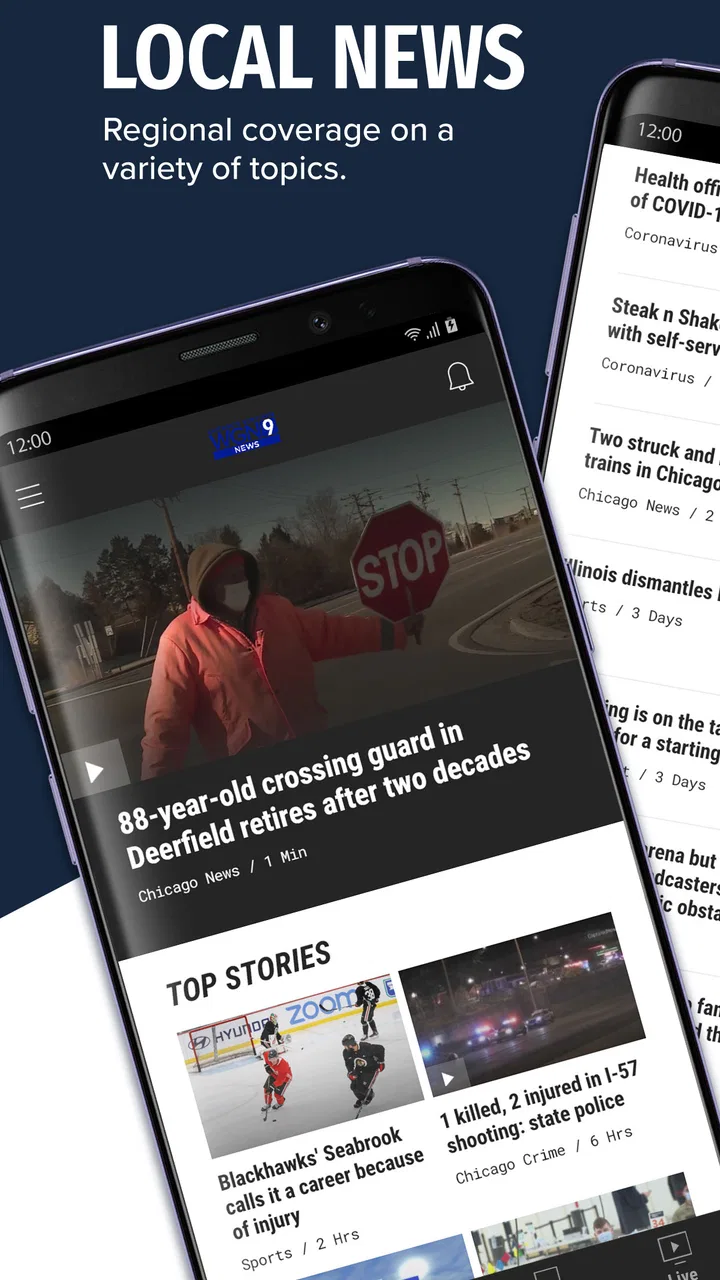
When I want a quick Chicago news check rather than a broad national news feed, WGN-TV is the app I reach for first. It is a free news and magazines app from Nexstar Inc. built around the reporting and live coverage of Chicago’s Very Own WGN-TV. The main appeal is simple: I can open it to see what is happening locally, watch available live coverage, and receive breaking-news alerts without sorting through a crowded general-purpose news service.
That focus also defines its limits. This is not the app I would choose for a complete national briefing, deep international reporting, or a carefully organized reading list from many publications. I see it as a local-news companion: useful when Chicago is the place that matters to me, and less convincing when I need a wider view. After spending time with it, I found that its value depends less on how many articles I read and more on how quickly it helps me move from a vague concern to a practical answer.
From a vague concern to a useful Chicago update
I find WGN-TV most useful when a local headline leaves me with a practical question: does this affect my plans, and what should I check next? This section looks at how I turn that uncertainty into a focused Chicago update, rather than treating every alert as a reason to keep scrolling. A good first check also depends on knowing when a local source is enough and when I need a wider view.
You May Also Like

 Blood Strike: 2.5 Anniversary
Blood Strike’s Loadouts Turn Every Drop Into a Tactical Gamble
A close look at Blood Strike’s custom loadouts: how fast access to signature weapons reshapes its battle royale rhythm, rewards preparation, and narrows the gap between fights.

 Pandora - Music & Podcasts
Pandora’s Music Is Easy to Start, but Harder to Recover
Pandora’s strength is its low-effort path from a seed to a station. Its weak spot is how much confidence it asks you to place in connection, setup, and quiet recovery.

 8 Ball Pool
 Is Built on Rivalries, Rematches, and Routine
A close look at the rivalries, rematches, shared routines, and unanswered safety questions that turn a quick pool match into a persistent mobile community.

 Samsung Music
’s Quiet Strength Is Playing What You Already Own
Its reach comes less from spectacle than from dependable access to a personal library. That simplicity is both the app’s strongest retention engine and its ceiling.

 AccuWeather: Weather Radar
AccuWeather Review: A Quick, Clear Forecast for Everyday Decisions
For everyday plans, the best forecast is the one you can understand quickly. AccuWeather makes rain timing, radar, and local conditions easy to act on, with a few trade-offs.

 Hill Climb Racing
Why Hill Climb Racing Still Turns Crashes Into One More Run
A tiny car, a bumpy hill and one more upgrade: Hill Climb Racing keeps resurfacing because its simple chaos makes every near-miss feel personal.
More From Our News Desk



Starting with the right question
The best way to use WGN-TV is to begin with a specific local question. I might be wondering whether severe weather is affecting a commute, whether a major road incident is changing travel plans, or whether an event near home has developed into a larger story. The app makes more sense in those moments than when I am simply looking for something to browse for half an hour.
Its store summary highlights livestreaming, breaking news alerts, and news from WGN-TV, and that combination gives the app a practical rhythm. An alert can bring a story to my attention, a written report can provide the immediate context, and live coverage can help when the situation is moving quickly. I do not treat those parts as interchangeable. Each one answers a different question, and knowing which one I need prevents a lot of aimless tapping.
For example, an alert is useful for awareness but usually too brief to guide a decision. A written story is better when I need names, locations, or a basic timeline. Live coverage is more valuable when events are unfolding and the situation may change while I am watching. The useful workflow is alert first, context second, live coverage when the story is still moving.
What I do when an alert arrives
When a breaking-news notification appears, I first decide whether it affects something immediate. If it does, I open the alert and look for the location and the central fact before doing anything else. That small habit matters because a dramatic headline can concern a distant part of the Chicago area, while the details determine whether it has any bearing on my plans.
I then check whether the story has enough information for the decision I need to make. If I only need to know whether a situation exists, the initial report may be enough. If I need to leave home, change a route, or warn someone else, I look for the fuller article and any available live presentation. I prefer this approach to repeatedly refreshing a social feed, where early rumors and later corrections can be mixed together without a clear sequence.
The app is especially useful here because it keeps the local source at the center of the process. I am not jumping between a national news app, a social network, and a television website just to establish what is happening in Chicago. That reduction in switching is one of its quiet strengths, even if the experience is not as expansive as a multi-source reader.
Using the written coverage as the middle step
After opening a story, I read enough to identify what is confirmed, what is still developing, and what action might be sensible. I find this middle step more important than it sounds. Live video can provide immediacy, but it is not always the fastest way to locate a particular detail. A written report is easier to scan when I am standing in a hallway, waiting for transportation, or trying to make a quick decision before leaving.
I also use the written article to judge whether the alert deserves more attention. Not every notification represents a major disruption to my day. Some are simply useful awareness, while others justify watching coverage or sharing the information with family. This is where I appreciate having a local station’s reporting rather than a generic stream of headlines: the subject matter is more likely to connect to the place where I actually live, work, or travel.
My practical tip is to avoid treating the first screen as the complete story. Breaking reports naturally evolve, and the first update may be designed to tell me that something is happening rather than explain every consequence. I return to the story only when I need a new decision, instead of assuming that constant checking automatically produces better understanding.
Moving from text to livestreaming
When the story is developing quickly, I move to the livestreaming option. This is where WGN-TV feels different from a standard local-news article app. Watching coverage can provide a sense of timing and movement that a static page cannot, particularly during a major weather event, a public incident, or a rapidly changing local situation.
Still, I do not use live video as background noise by default. It demands more attention, and the value depends on whether the story is changing fast enough to justify that attention. If I only need a road name or a brief update, reading is more efficient. If I need to understand the sequence of events or hear the latest presentation as it develops, livestreaming becomes the better handoff.
There is also a useful trade-off for people who consume news while multitasking. A live stream can be easier to follow while doing something else, but it can also make it harder to find one precise fact later. When I expect to need a detail again, I make a note of the article rather than relying on memory from the broadcast. That is a small workflow improvement, but it keeps the app from becoming a passive screen that I watch without retaining anything useful.
How I handle notifications
Notifications are central to the app’s purpose, but they can quickly become annoying if I allow every interruption to compete for attention. I think of alerts as an input channel, not as the news experience itself. I want them to tell me when a local story may deserve a look, while the app’s articles and live coverage do the work of explaining it.
On a busy day, I prefer to open an alert when I have enough time to read the first screen properly. If I am driving, working, or already dealing with an urgent situation, I wait until it is safe and practical. A notification is valuable only when it leads to a sensible next step; otherwise it becomes background pressure.
This is also why the app may not suit someone who wants a quiet reading environment. A person who dislikes breaking-news interruptions may be happier with a traditional newspaper app or a manually refreshed news reader. WGN-TV is designed around timely local awareness, so its strongest feature can feel like its biggest nuisance when the user wants complete control over when news appears.
The handoff from phone to household decision
The real test of a local news app is what happens after I finish reading or watching. In my everyday use, the outcome might be changing a route, delaying an errand, checking on someone in another neighborhood, or deciding that no action is needed. The app is not the decision itself; it is the first reliable step toward making one.
For a realistic example, imagine that I am preparing to leave for work and receive a breaking alert connected to a part of Chicago along my route. I open the report, check the location, and compare the timing with my plans. If the written details are not enough, I watch the available live coverage for a broader sense of what is unfolding. I then pass the practical takeaway to a family member or coworker: leave later, use another route, or continue as planned.
That handoff is where local relevance matters. A national app might mention a significant event, but it may not make the neighborhood-level connection I need. A social network might offer eyewitness posts, but I would have to sort through uncertain information. WGN-TV gives me a more direct path from local alert to local context, even though I still use common sense and do not treat any first report as the final word.
Who benefits most from this workflow
I think the app is a strong fit for Chicago residents, commuters, students, families, and anyone who regularly needs local information rather than a worldwide news digest. It is also useful for former Chicago residents who want a straightforward way to keep up with the city, provided their main interest is WGN-TV’s local coverage rather than a broad collection of outlets.
It can help people who do not watch television regularly but still want access to a station’s breaking coverage. The phone-based format makes the station more available during a commute, lunch break, or short pause at home. I also see value for users who prefer a familiar local newsroom over an algorithmic feed that constantly changes its priorities.
On the other hand, I would skip it if my main goal were customized national headlines, international analysis, financial coverage, or a single place to compare many editorial viewpoints. A broader news aggregator is better for that. Someone who wants long-form reading, saved topics, or a highly personalized magazine-style experience may also find this app too centered on immediate local updates.
How it compares with the usual alternatives
Compared with a general news aggregator, WGN-TV feels narrower but more geographically useful. An aggregator gives me more subjects and more sources, yet that abundance can make a local question harder to answer quickly. With this app, I trade breadth for a clearer connection to Chicago and to the station’s live reporting.
Compared with reading WGN-TV through a mobile browser, the app’s main advantage is convenience around alerts and the dedicated route into coverage. A browser can be perfectly adequate for occasional visits, especially for someone who does not want another app installed. I prefer the app when I want local breaking news to come to me instead of remembering to check a page manually.
Compared with social media, the app is a calmer starting point for verification. Social platforms may surface information sooner from people at the scene, but they also require more work to establish what is dependable. WGN-TV is not a replacement for judgment, yet it gives me a newsroom-centered workflow rather than making me assemble one from scattered posts.
Compared with a national television-news app, it is more relevant for Chicago-specific decisions and less useful for understanding the wider country or world. That is not a flaw in itself. It simply means I would pair it with another source if I wanted a complete daily news routine. I would not expect one local station app to cover every information need.
Practical details before installing
WGN-TV is free, which makes trying it low-risk for anyone who wants local alerts and station coverage without adding a subscription to the budget. It is listed for a Teen audience, so families should still consider whether the intensity of breaking local news is appropriate for younger users, even though the app is not presented as a children’s product.
The app has been available since March 11, 2013, and its current version is 510.0.1. It supports Android 7.0 and later. Those details matter if I am installing it on an older phone: compatibility is not something I want to discover only after clearing space or changing devices. The app has passed one hundred thousand installs and holds a 3.3 average from around two thousand ratings, with more than eight hundred written reviews. I read that combination as evidence of a useful but not universally smooth experience rather than a reason to accept every part of it uncritically.
The rating also matches my general impression: the concept is clear and worthwhile, but local-news apps live or die by small moments of friction. If an alert arrives at the wrong time, if I need to move through several screens to find the relevant coverage, or if a live presentation is not what I expected, the value can drop quickly. I would install it for the local news function, not because I expect a flawless replacement for every other news tool.
Where the flow breaks
The workflow breaks first when I need a very broad perspective. WGN-TV can help me understand a Chicago story, but it is not the right endpoint for comparing national reactions, international context, or multiple editorial interpretations. In that situation, I move to a broader service rather than forcing this app to do a job it was not built around.
It also breaks when I need a precise answer immediately and the story is still developing. An alert may identify the event without resolving the practical question I have. Live coverage may add context, but it can take time to reach the detail I need. I have learned to treat early information as a starting point and to avoid making a serious decision based on a headline alone.
Another weak point is attention management. The same alerts that make the app valuable can interrupt too often for someone who wants news only at chosen times. If I were trying to reduce phone distractions, I would use a less notification-driven alternative or limit the app’s interruptions through my device settings. The app works best when I decide how alerts fit into my day instead of allowing them to dictate the day’s rhythm.
Finally, the app is not ideal for readers who want a permanent personal archive of everything they follow. My use is more immediate: notice, read, watch if necessary, and act or move on. If I wanted a carefully curated collection of articles for later research, I would use a dedicated reading system alongside it. That distinction helps set realistic expectations and prevents disappointment.
My final take after following the full process
I recommend WGN-TV to anyone whose news decisions begin with Chicago. Its strongest path is easy to understand: receive a local alert, open the report, switch to livestreaming when events are moving, and turn the result into a practical choice. That flow is more useful than simply listing features because it reflects how I actually use the app in daily life.
My honest recommendation is to install it as a focused local-news tool, not as your only news source. It is free, accessible on older Android versions, and closely tied to Nexstar Inc.’s WGN-TV coverage. The 3.3 average suggests a mixed experience, and I agree that its usefulness depends on how well its alert-driven design matches my habits.
If I lived in Chicago or regularly needed to know what was happening there, I would keep it available for breaking updates and live coverage. If I wanted a quiet, deeply personalized, multi-source news library, I would choose something else. For the right reader, WGN-TV succeeds by shortening the distance between a local event and a sensible next action. That is a modest promise, but in the moments when local information matters, it is exactly the promise I want the app to keep.
FAQs for WGN-TV
01What is WGN-TV, and what can I do with the app?
WGN-TV is a news and weather app connected with Chicago’s WGN-TV station. After installing it, users can browse local and regional news stories, watch selected video reports, check weather forecasts, view radar information, and receive updates about important events. The available content may vary depending on your location, device, internet connection, and the station’s current programming schedule.
02Does the WGN-TV app provide live news and television streaming?
The app may offer live coverage, breaking-news streams, or clips from WGN-TV, but access is not necessarily the same as receiving the complete television channel. Some broadcasts can be restricted by location, licensing agreements, or programming rights. Before downloading, users should check the current app description and confirm whether live streaming is available in their area and whether any content requires a participating television provider.
03Can I receive breaking-news, weather, and emergency notifications?
Yes, the WGN-TV app can support push notifications for breaking news, severe weather, traffic developments, and other important local updates. Notifications are usually optional and can be enabled or disabled through the app or your phone’s system settings. If you allow them, make sure location permissions and notification preferences are configured correctly so alerts are relevant without becoming unnecessarily frequent.
04Is the WGN-TV app free to download and use?
The WGN-TV app is generally available to download without an upfront purchase, allowing users to access news, weather, videos, and other station content. However, free access does not always mean an entirely advertising-free experience. The app may display advertisements or sponsored material, and some live or premium content could depend on provider authentication or regional availability. Review the store listing for current terms.
05What permissions and internet connection does WGN-TV require?
WGN-TV works best with a reliable Wi-Fi or mobile-data connection, especially when playing live video, weather radar, or news clips. Depending on the features you use, it may request permission to send notifications, access approximate location for local forecasts, and use storage or device functions needed for media playback. You can deny optional permissions, although certain personalized features may then be limited.
Pros
- Live local news
- weather
- and traffic updates in one app.
- Breaking-news alerts help users stay informed throughout the day.
- Video reports provide more context than short text updates.
- Covers Chicago-area events
- neighborhoods
- and community stories.
- Free to download and easy to browse on mobile devices.
Cons
- Some content may be limited by location or regional availability.
- Frequent notifications can feel excessive unless carefully managed.
- Video playback may use significant mobile data.
- Advertising can interrupt browsing and video viewing.
- App performance may vary on older devices or slower connections.

WGN-TV
Gallery